Studio · stone & countertop visualizer THEIR KITCHEN. WITH YOUR SLAB.

One photo of the room and the client sees their countertop with the slabs in your yard. They choose, approve, and the slab is held for them.

Studio · renders

The client's photo

Today's renders0/4

Pick a project. Studio runs it again.

minutes for a render, not 2 weeks
3
ready to send, to the client or the architect
4K
phone photo is all it needs
1
surprises on installation day
0

Illustrative scenario

Three minutes with Studio

From a phone photo to an approved kitchen.

  1. 10:00

    A photo of the kitchen, as it is.

    The client, or your salesperson, photographs the room with a phone. No measuring, no designer.

  2. 20:20

    Studio finds the surfaces.

    The island top and its sides. Each surface is ready to take the stone.

  3. 30:45

    Two slabs from your yard.

    Arabescato Viola, bundle B-2252, slabs 7 and 8. The real ones, by number, opened like a book.

  4. 42:48

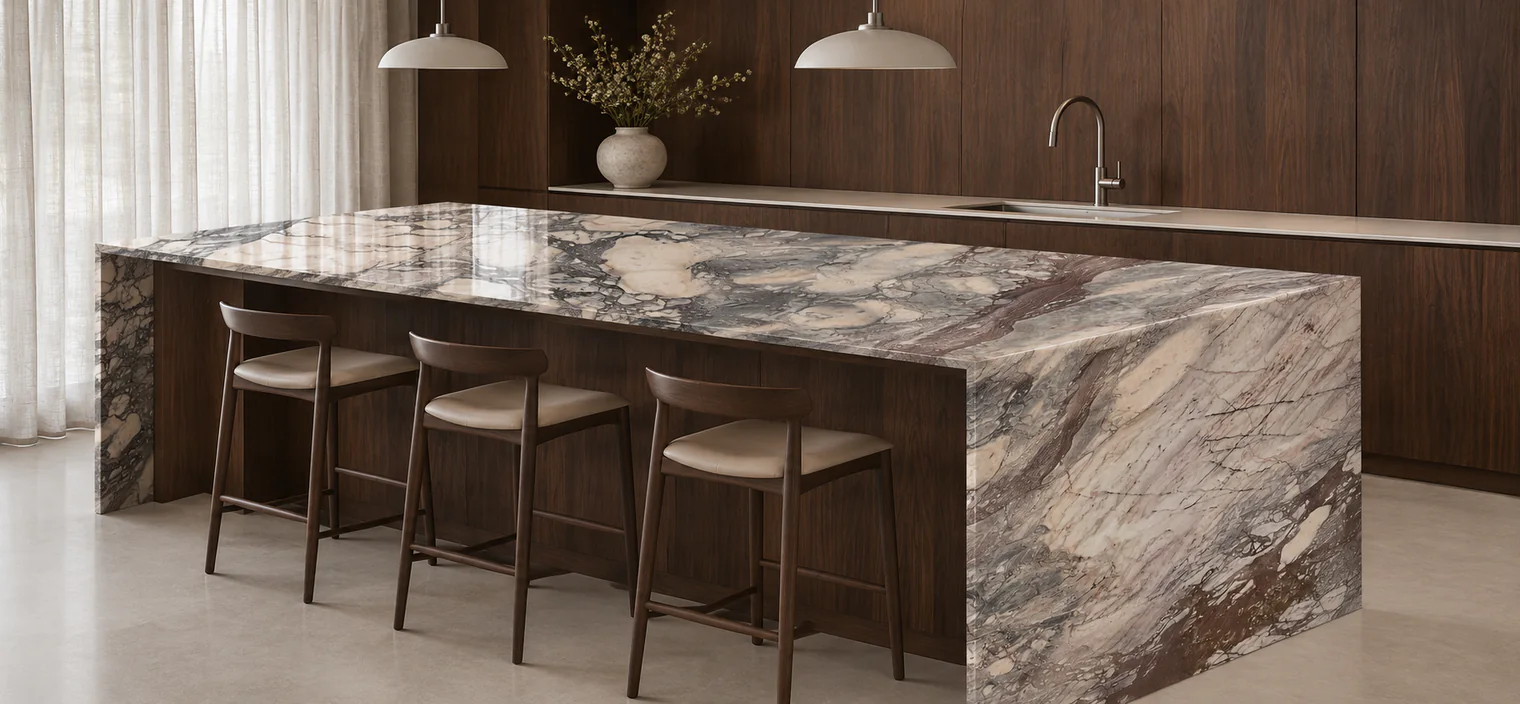
    The kitchen, with that stone.

    Veins, color and light, from the photo of your own slabs. In 4K, ready to send.

  5. 5Same day

    Approved. The slabs are held.

    The client says yes from their phone. Slabs 7 and 8 are held for them, and the layout goes to the workshop.

1 / 5

01Your slab, not a texture

A texture repeats. Your slab does not.

Most visualizers lay a catalog texture, the same tile over and over. Studio lays the photo of the slab in your yard, with its own veins and its number. What the client approves is what they get.

  • The photo of every slab, from your stock
  • One slab, one number: the client approves that one
  • Veins that run on, not a pattern that repeats
  • Grade and bundle beside the render
Arabescato Viola · B-2252 · #7

Catalog textureThe same tile, 8 times

Your slab · #7One slab, one pattern

Arabescato ViolaB-2252 · #7Lithos A

02Bookmatch

The seam, before the cut.

Two slabs from the same bundle open like a book, and their veins meet in the middle. Four make a pattern for a wall. The client sees the seam where it will be, before anyone touches the saw.

  • Bookmatch from consecutive slabs of one bundle
  • Four-way patterns for walls and floors
  • Slabs in their cutting order, as in the yard
  • The pair is held together, never split
In the renderKitchen island · MunichArabescato Viola · B-2252

03Layout

Every piece on the real slab.

The island top, the front and the side sit on the photo of the slab, with the veins where they belong. You see what is used and what is left before you cut, and what is left goes back to stock.

  • Pieces placed where the veins are best
  • Veins that run on from piece to piece
  • Use and waste, before the cut
  • Remnants back to stock, with size and photo
Slab #7 · 320 × 195 cm
Used
76%
Left over
24%

Remnant 95 × 100 cm → stock

04On their own

The client tries it alone, from your Portal.

At home, at night, from the phone. They photograph their room, try your slabs on it and hold the one they like. You see which slabs they tried and which one they held.

  • From their phone, with no app
  • Only your slabs, under your name
  • The slab they like is held for them
  • What they tried shows on their card
21:055G
stock.yourcompany.com
Arabescato ViolaB-2252 · #7–82 cm320 × 195A

Your desk

  • A buyer in Munichtried Calacatta Borghini21:02

On the client's card, with the renders

05To the workshop

From the approved render to the installed kitchen.

The render the client approved goes into production with the same slabs and the same layout. Nobody draws it again, and nobody cuts the wrong slab.

  • The approved layout becomes the job
  • The same slabs, by number, to the saw
  • On installation day, the kitchen looks like the render

Job K-2041 · kitchen island

B-2252 · #7–8
  1. 01Approved render
  2. 02Slabs held
  3. 03Layout on the slab
  4. 04Cut
  5. 05Installed

The same slabs, from start to end

The difference
The difference

A render tool knows pixels. Studio knows stone.

Stone is not wallpaper. Every slab is one of a kind, with a number, veins and a pair. Studio works with that.

  • The exact slab

    Slab 7 of bundle B-2252, not “a Calacatta”.

  • Veins where they are

    The pieces sit on the slab's own veins.

  • Bookmatch

    Consecutive slabs open like a book.

  • Four-way

    Four slabs, one pattern, for walls and floors.

  • Color and light

    From the photo of your slab, in the light of their room.

  • Slab size

    A piece that does not fit the slab shows before the cut.

  • Remnants

    What is left goes back to stock, for small pieces.

  • Held when approved

    The slab they chose is held for them.

With Strata AI

The AI knows what they will like.

From the client's choices, Strata AI suggests slabs that are in stock and suit their space.

All about Strata AI
Strata AI

You: What should I suggest to the architect for the living room with dark wood?

Two: Calacatta Caldia for contrast, and the warmer Arabescato Corchia. You have 6 and 4 slabs. The renders are ready in Studio to send.

From the room photo and stock

Ask

Questions

Studio: questions

One photo of the room from a phone. Studio recognizes countertops, floors and walls and puts the slab on them.

Enough for the client to decide: real veining, color and light, from the photo of your own slab.

Yes, from the Portal: they upload their photo and try your slabs whenever they like.

The layout the client approved goes to production, with the same slab and the pieces in place.

Kitchens, bathrooms, living rooms and halls: countertops, islands, floors and walls. From the client's photo or a sample room.

Yes. The render uses the photo of that slab, by its number. When the client approves, that slab is held for them and goes to the job.

See your own stone
inside Noria.

With your blocks and your slabs.